Sub Plans, Solved
Pick the day you're out. Your periods and times come from the planner, the lesson already on each class comes with them, and any open class gets a sub-ready lesson in about a minute. Print the packet or send the sub a link.
One Page, Your Whole Day
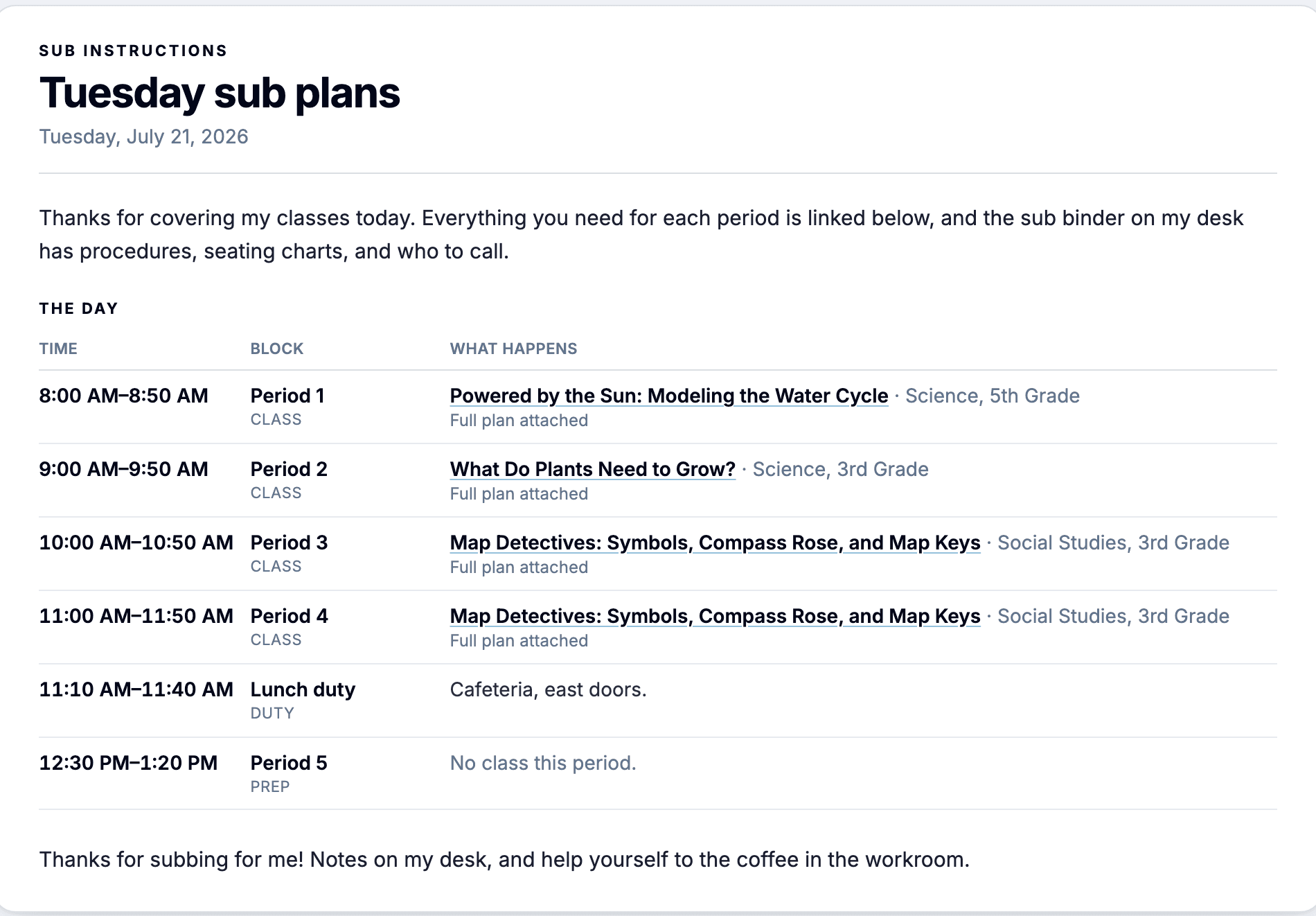
- Seeded From Your Planner: Every period with its times, in order, plus the lesson already placed on that day. Add lunch duty, a meeting, or a prep block in one click
- A Lesson in Every Class: Link a lesson from your library, or generate a sub-ready one written for a colleague: the purpose of each activity, what students produce, and what on-track work looks like
- Print the Packet: One click prints the sheet and every linked lesson in full, ready for the desk or the sub folder
- Share a Link: Send the sub a private link to the same page, readable on any device. Turn it off when you're back
What you get
Built for the Day You're Out
Written for the professional covering your room
One Page for the Day
Times, classes, lessons, and two short notes to the sub. The binder on your desk covers procedures and seating, so the page stays short
Sub-Ready Lessons in a Minute
Say whether students have devices and get a self-contained lesson: an overview for the sub, timed activities, printable student work, and what to do if they finish early or the tech fails
Students Run It Themselves
Turn any lesson into a Digital Experience, a self-paced version students work through on their own devices while the sub circulates
Reuse It Next Time
Duplicate a sub day for another date. Your notes to the sub carry over, so the personal touches are written once
How it works
From planner to sub packet
Pick the Day
Open the planner, choose the day, and click Make sub plans. The page arrives with your periods and their times already filled in.
Fill the Open Classes
Any class with a lesson on the board already has one. For the rest, link a lesson from your library or generate a sub-ready one on the spot.
Add What the Sub Needs
Drop in lunch duty or a meeting, write a one-line note per class, and adjust the opening and closing notes if you like. The defaults already work.
Print It or Send the Link
Print the sheet and every lesson as one packet, or share a private link the sub can open on any device.
Why teachers use it
Why Teachers Keep Sub Plans Here
Nothing to Rebuild
The day already exists in your planner. Sub plans start from it instead of from a blank page.
Written for a Colleague
Each activity states its purpose, what students produce, and what on-track work looks like, so the sub can make judgment calls without a script.
Every Lesson in Full
Each class links to a complete lesson plan with its materials, so the sub has the same depth you would.
Nothing About Students Stored
The page holds your schedule and your notes to the sub. Nothing about an individual student is kept in the app.
Build Your Next Sub Day in Minutes
Sub plans are included with every free account. Set up your planner once, and the day you're out comes together from what's already there.