Your Whole Week, On One Board
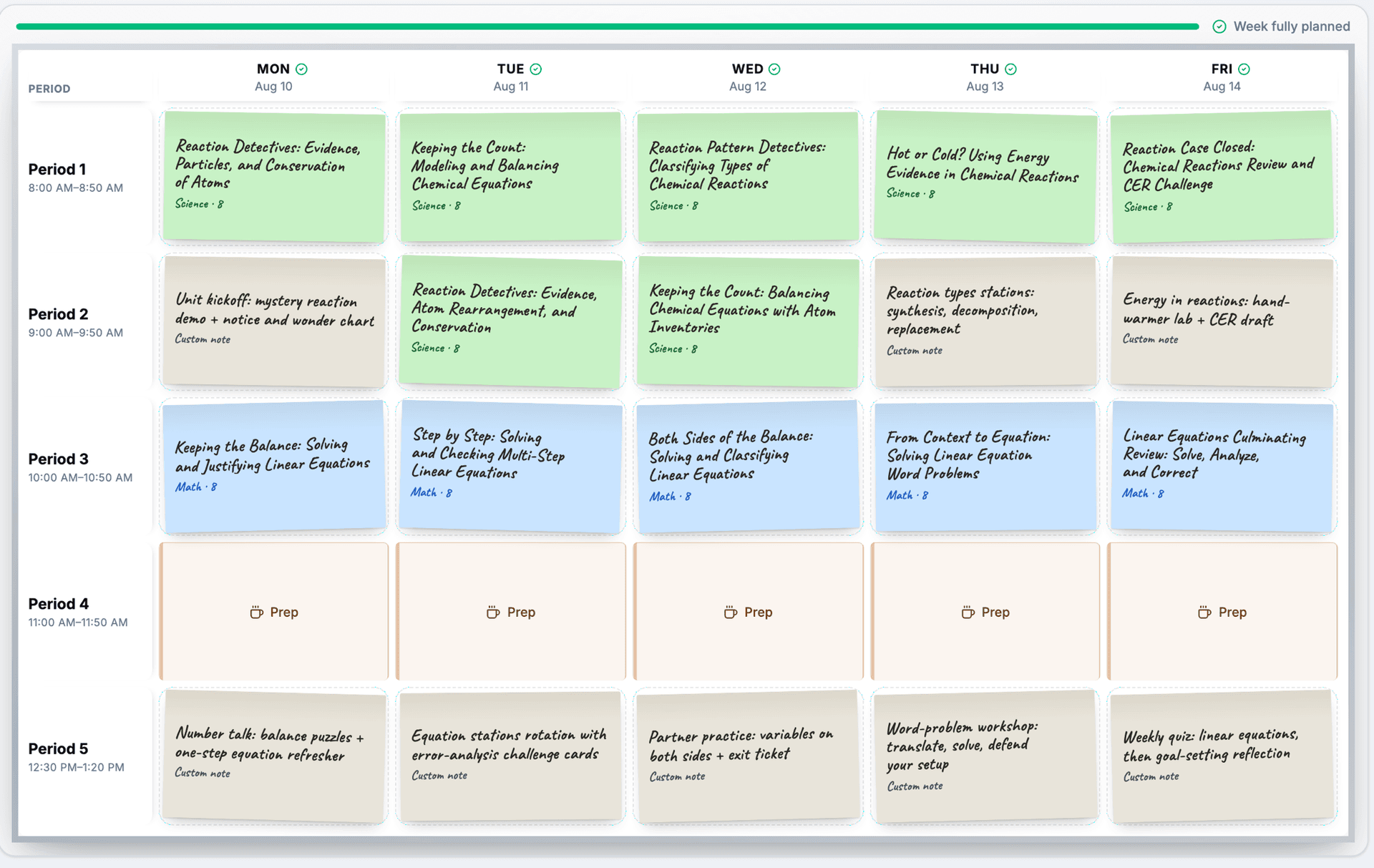
Drag lessons from your library onto a weekly board that matches your real schedule. Move things when the week changes, mark prep time, and see at a glance which classes are planned and which are still open.
A Week You Can See
- Drag-and-Drop Planning: Pick up any lesson card and drop it into a class. Moves and swaps land instantly
- Your Real Bell Schedule: Name your periods, set their times, mark prep, and the board puts your week on the actual clock
- More Than Lessons: Add events for assemblies, field trips, and testing days, or type a note into an empty period and turn it into a full lesson
- Today on the Clock: Day view gives every activity its own time range, with a NOW marker that follows the one you should be teaching
What you get
Built Like a Teacher's Week
Planning tools that match how school actually runs
Drag, Drop, Done
Place a lesson, move it to another day, or drop it on another lesson to swap the two. Every change saves as you make it
Mapped to the Minute
Set period times and each lesson lands on the clock, activity by activity. A lesson that runs long says exactly how many minutes over the period
Prep and Custom Events
Reserve prep periods, and put assemblies, testing, and field trips on the board so the week reflects reality
Print It, Share It
Print a clean copy of the week for your desk or sub folder, or share a view-only link to your schedule with a co-teacher or sub
How it works
From empty board to planned week
Set Up Your Schedule Once
Add your periods, their usual times, and which ones are prep. The board matches your school day from then on.
Fill Your Week
Drag lessons from your library onto the board, or click any empty class to choose one.
Rearrange as Plans Change
Swap lessons between days, place one lesson across several class periods, or drag a card back to the library.
Teach From One Board
On teaching days, switch to day view: every period with its times, every activity with its own clock range, and a NOW marker tracking where you are in the day.
Why teachers use it
Why Teachers Plan Their Week Here
Sunday Night, Solved
Plan the week in one sitting and start Monday knowing every period is covered.
Reuse Across Sections
Teach the same course three times? Place one lesson into every section's period in one step.
Connected to Your Library
Every card is a full lesson plan. Preview its timeline, objectives, and materials right on the board, or open it in one click.
Help From Your Assistant
Ask the Teaching Assistant what's on your week or have it place lessons for you.
Plan Next Week in Minutes
The weekly planner is included with every free account. Set up your schedule, drag lessons into place, and see your whole week before it starts.